Your business runs on personal cards. Zenny sorts it out.
Every transaction lands in one inbox. Zenny files business and personal apart as they happen — and asks about the few it can't call. The annual statement scramble becomes a few decisions at a time, all year long.
Public beta · Free for 30 days, card required · Bank connections by Plaid · Two-factor for email sign-ins
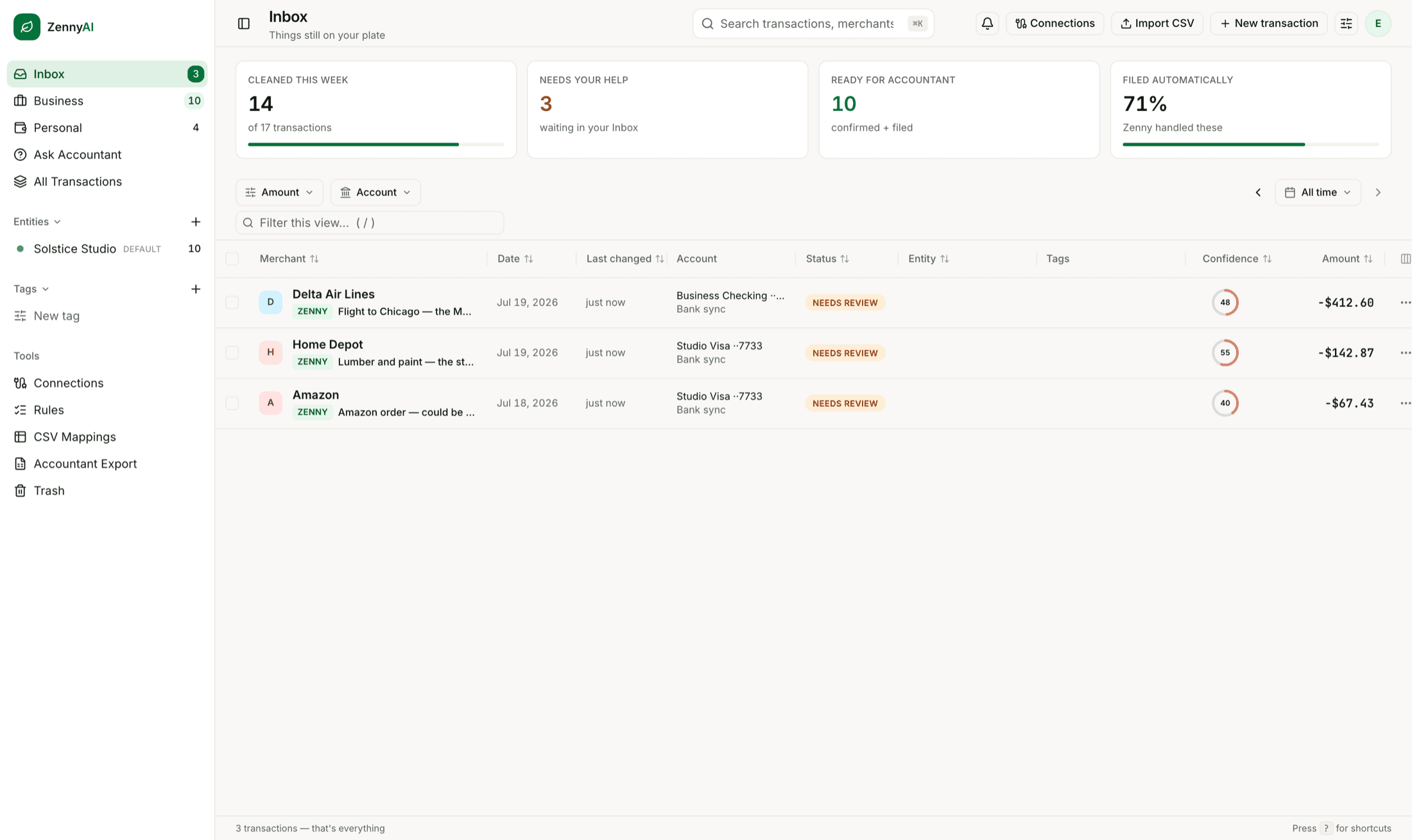
From tangled to accountant-ready in three moves.
Every April you become a forensic accountant — scrolling twelve statements, highlighting line items, rebuilding the year from memory. Zenny does that work all year long, a few seconds at a time.
Connect what you actually use
Link the personal checking and cards your business really lives on — read-only, through Plaid — or drop in CSVs. Zenny imports the history your bank makes available, so day one starts with context, not a blank ledger.
Zenny files; you stay in charge
High-confidence matches file themselves, with a visible audit trail. Probably-right waits with a review badge you can glance at. Genuinely unsure? Zenny asks — one tap. Answer the same way a few times and it drafts a rule; nothing becomes automatic without your approval.
Hand your accountant a link
One share link holds a clean CSV, a CSV formatted for QuickBooks import, and a PDF summary packet. It expires after 90 days and you can revoke it anytime. Everything you file as business is labeled so your accountant can review and sort it however the books need.
Files itself
Waits in your inbox with a review badge
Asks you — one tap
How business-side calls are handled. Confidence is Zenny's own estimate — not a guarantee that a filing is correct or deductible.
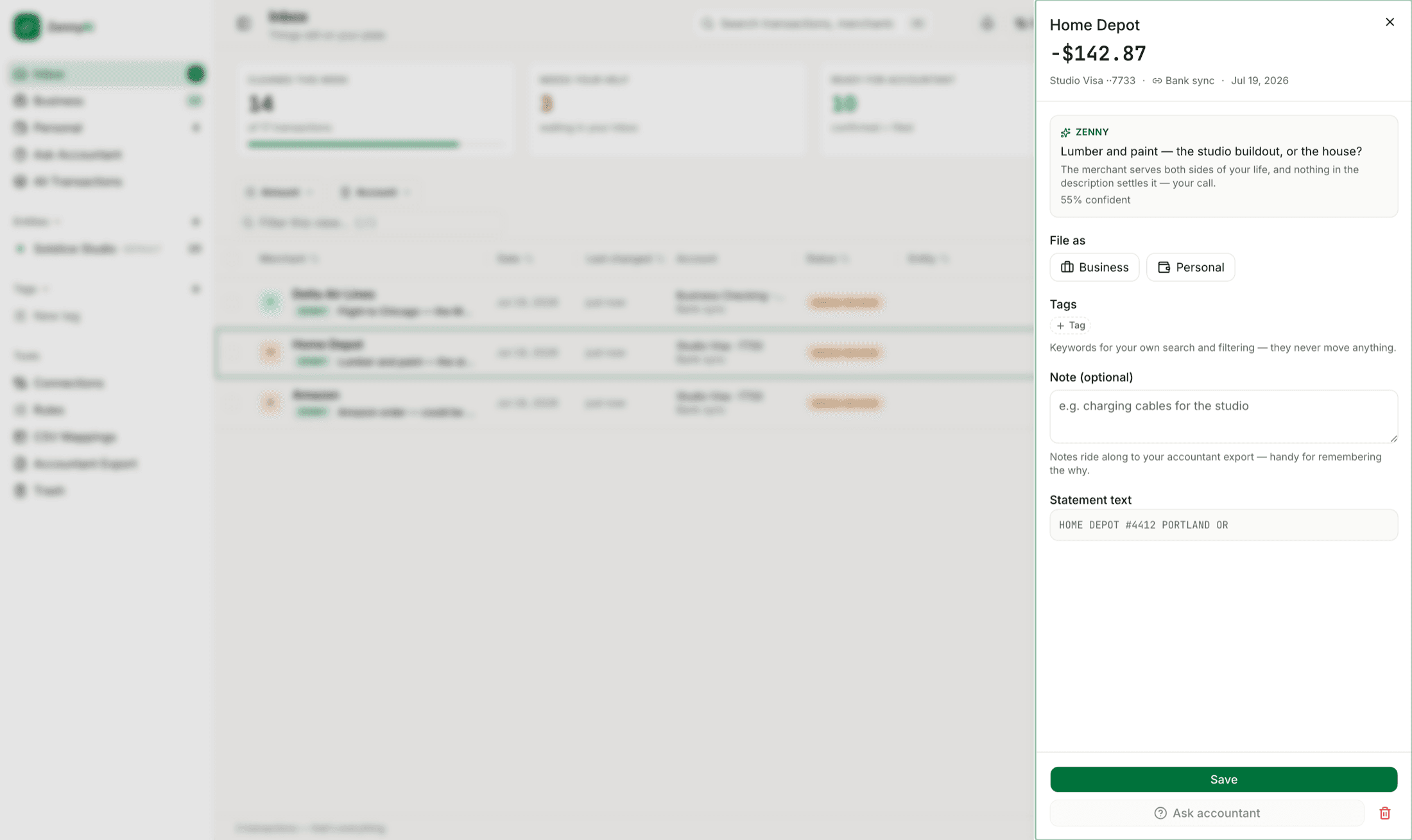
When Zenny isn't sure, it says so.
Home Depot could be the studio buildout or the house — so Zenny asks, in plain English, with its confidence right on the label. One tap files it; answer the same way a few times and it drafts the rule. When AI is making the call, you always know — and you can always change it.
Serious bookkeeping, zero bookkeeping feel.
Zenny isn’t accounting software — on purpose. It does one job extremely well: spotting what looks like business inside personal accounts and keeping it organized for your review — and the handoff.
An inbox, not a ledger
Archive what’s done, snooze what can wait, ⌘K to find anything. If you can run an email inbox, you already know how to run your books.
Labels, not charts of accounts
Zenny answers one question — business or personal? Business spending gets a label you choose (a company, a rental, whatever fits). No tax categories, no “Schedule C” — that’s your accountant’s job, not your inbox’s.
Rules you approve
File the same merchant the same way a few times and Zenny drafts the rule for you. Approve it once and it applies to every future match — until you edit, disable, or delete it. Changing your mind takes one tap.
Your history, on day one
Backfill through your bank connection — as much history as your institution provides — plus CSV import for anything older. You start with context, not a blank page.
Splits without the spreadsheet
Dinner was half client, half date night? Type the business amount. The rest stays personal. No sliders, no line-item surgery.
Built for a quick weekly review
A weekly digest email shows what was filed and the few things waiting on a decision — counts only, never transaction details. How long the review takes depends on your volume; for most solo books it’s minutes, not evenings.
If you can use Gmail, you can do your books.
Archive what's done. Answer what's waiting. Search when you need something. That's the whole skill set — you've been training for this in your email since 2004.
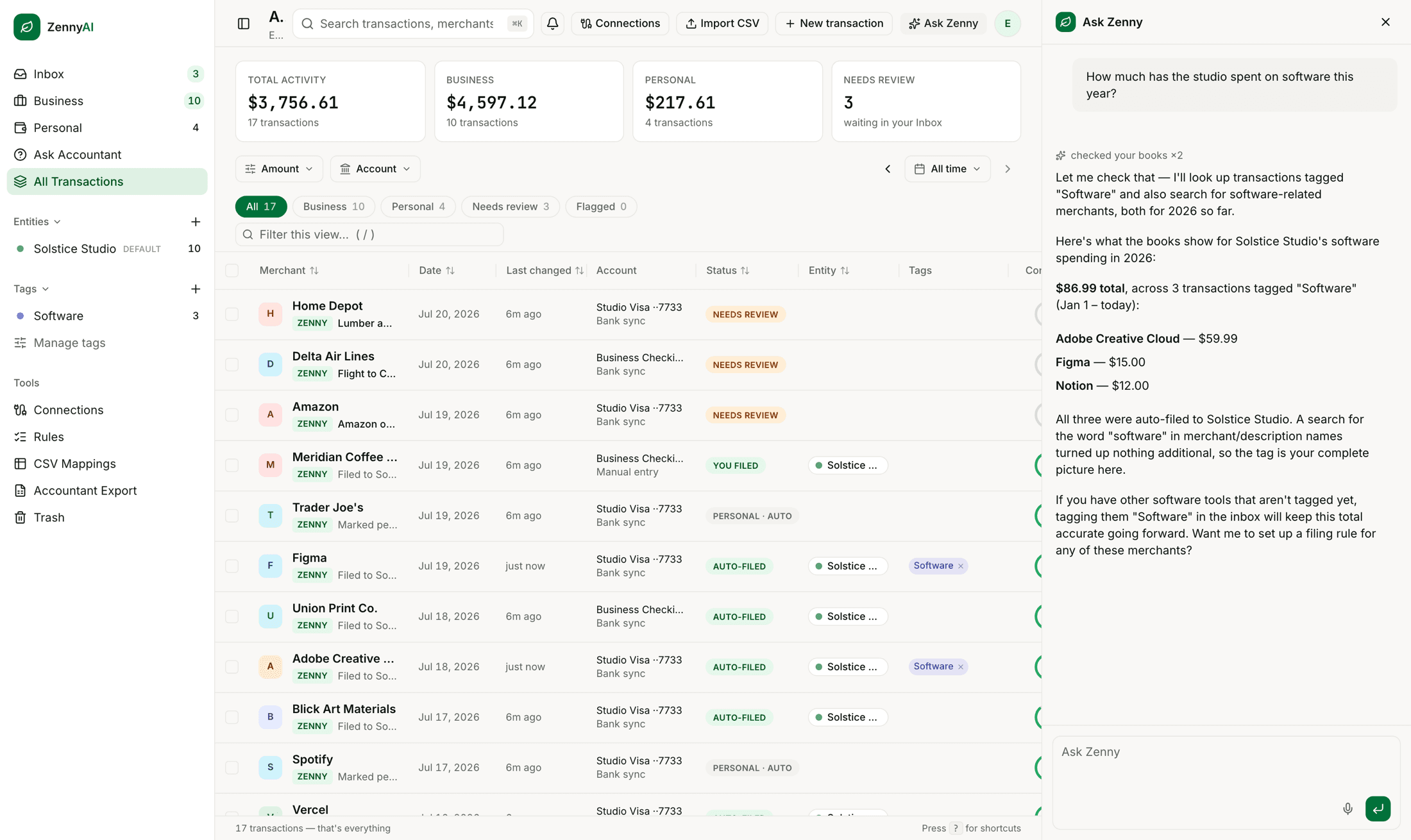
Have a question? Ask your books.
“How much did I spend on software this year?” gets a total calculated from the transactions in your books — with the rows behind it shown, so you can check the math. Ask why something was filed the way it was, and Zenny shows the reasoning it used.
And it drives, too: say “show me June's business spending” and Zenny changes the view — filters set, totals computed, the table showing exactly the rows it's talking about. Same books, same numbers, always.
Type it — or press the mic and just say it.
Answers reflect the transaction data available and your current filings — and they're never tax advice.
Triage from your thumb.
A charge lands while you're in line for coffee; you file it before you reach the counter. The day-to-day lives on your phone — the serious sit-down work stays beautiful on the desktop.
- The same inbox, shaped like an app — not a shrunken website
- Totals one glance away, filing one tap away
- Add cash and checks the moment they happen

Zenny for iPhone
Coming soon to the App Store
Tax season, gift-wrapped.
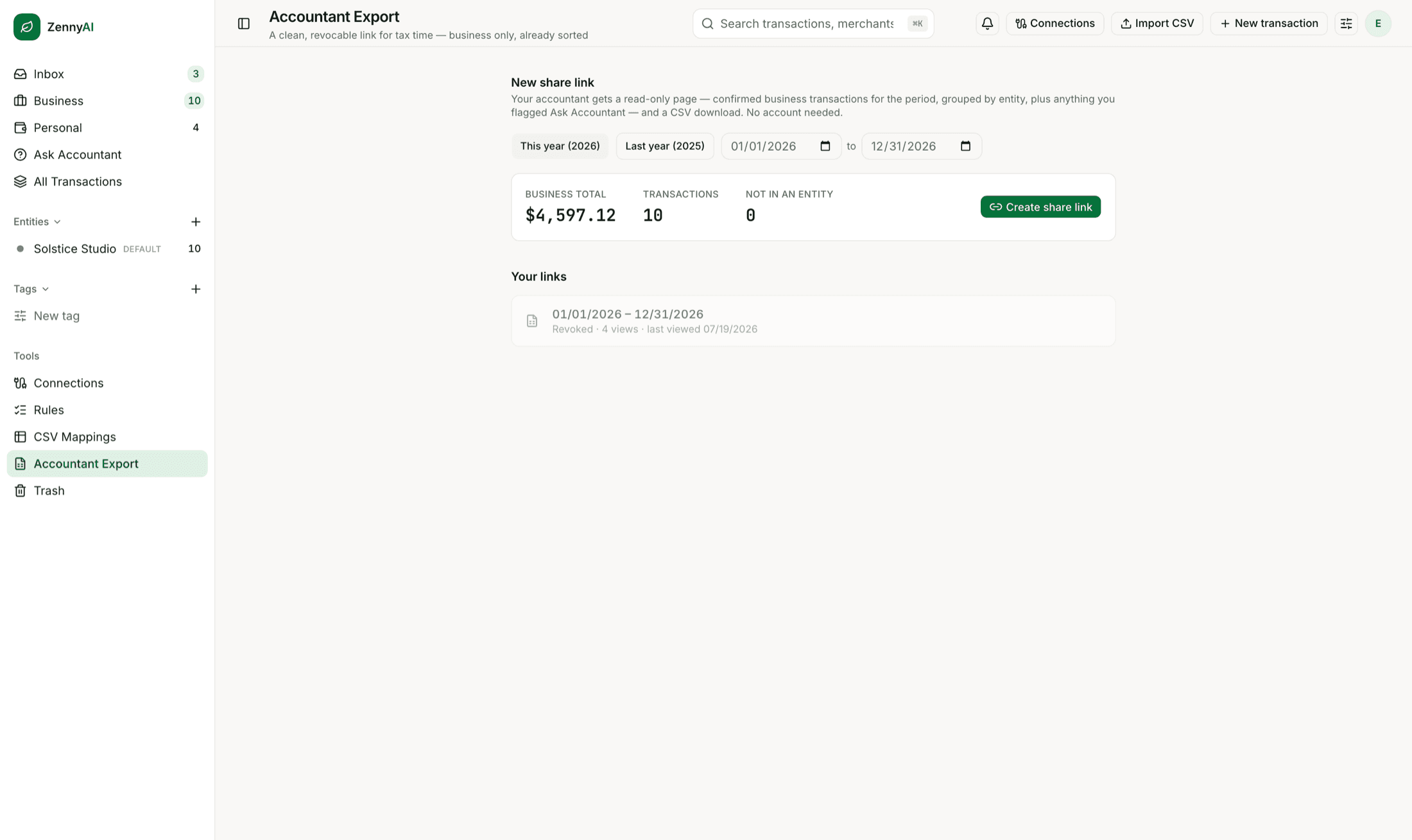
Your accountant doesn’t want your bank login, a shoebox, or forty screenshots. They want clean data they can import. Send one link and you’re done — it expires on its own, and you can pull it back anytime.
- Expires after 90 days, revocable anytime
- Everything filed as business, labeled for review
- No account required on their end
Built like it's your money. Because it is.
Your bank login never touches us
Bank connections are handled by Plaid — the same rail the apps on your phone already use. ZennyAI receives the read-only transaction data you authorize; it cannot move money, and your bank password never passes through our servers.
Two-factor for email sign-ins
Email sign-ins require an authenticator code — mandatory, not buried in settings. Google and Apple sign-ins lean on your provider’s own protections, and the app tells you plainly which one is guarding your account.
Nothing happens silently
Every automatic filing shows what Zenny did, why, and how confident it was — and every one of them can be undone with a tap. AI that touches your books should be reviewable. Ours is, everywhere.
One plan. Priced like a subscription, not a bookkeeper.
No tiers to decode, no per-account fees, no “contact sales.” One plan — $24.99/month, with a free 30-day trial. The trial needs a card, but nothing is charged until it ends. Subscribe during the public beta and you’re a founding member: you keep $24.99/mo for as long as you stay subscribed, whatever the price does later. The founding window closes at full launch.
ZennyAI
Solo — everything included
Connected banks & cardsup to 5
AI filing & review badgesincluded
Chat with Zennyunlimited*
Rules you approveincluded
Historical importincluded
Accountant share linksincluded
Weekly digestincluded
Tax-season modecoming soon
Solo plan$24.99/mo
30-day free trial−$24.99
Total$0 for your first 30 days
card required · then $24.99/mo · founding members keep it while subscribed
✻ public beta · founding-member pricing locked ✻
*Chat is unlimited within fair use — no message counting, just a generous daily ceiling that stops automated, extreme-scale use. Hit it doing real bookkeeping? Tell us and we’ll raise it.
Start your free trialThe only receipt we’ll ever ask you to keep. (Zenny doesn’t store receipts — that’s your accountant’s department.)
Fair questions, straight answers.
Can I use it today?
Yes — ZennyAI is in public beta. Sign in with your email, Google, or Apple and your account is created on the spot; there’s no separate signup. Every subscription starts with a free 30-day trial, then $24.99/month. You add a card to start the trial, and nothing is charged until it ends. Everyone who subscribes during the public beta is a founding member — you keep that price while continuously subscribed, whatever it does later. The founding window closes at full launch.
What does it cost?
One plan: $24.99 a month, everything included — up to 5 connected banks and cards, chat with Zenny (unlimited within fair use), CSV and PDF import, exports, and the accountant share link. Every subscription starts with a free 30-day trial, so you see your own books sorted before you pay a cent. The trial needs a card, and nothing is charged until it ends.
Is this accounting software?
No — on purpose. QuickBooks and Xero want to run your whole business; TurboTax wants to file your return. Zenny owns the messy middle: spotting the likely business transactions inside your personal accounts and handing them over organized for review. Deductibility itself stays your accountant’s call.
Do I need a business bank account?
No — that’s the whole point. Zenny is built for people whose business spending happens on the same three-to-five personal cards as everything else.
How does the bank connection work?
Through Plaid. ZennyAI receives the read-only transaction data you authorize — it never sees your bank password, and the current integration cannot move money or make changes. Prefer not to connect an account? Import CSV or PDF statements instead.
What happens to my personal spending?
Zenny looks at a transaction’s details to make exactly one call: business or personal. Once something is filed personal, it stays out of business labels, totals, and accountant exports unless you change the filing. Zenny is not a budgeting app — no budgets, no spending scores, no judgment.
What can I ask Zenny?
Anything about your books: totals, what’s waiting on you, why something was filed the way it was. You can also ask for a view — "show me June’s business spending" — and the table changes to exactly those rows. Zenny suggests and organizes; it never gives tax advice, and anything beyond showing and explaining asks for your approval first.
What about receipts?
Zenny doesn’t store them — keep original receipts wherever your accountant likes them.
How do I sign in?
Magic link: type your email, click the link, enter your authenticator code — you’re in. No passwords to invent, reuse, or forget, and a stolen inbox alone isn’t enough to reach your books.
Make April just another month.
Set it up this afternoon — connect your cards or drop in CSVs, and Zenny starts sorting the history your bank provides right away.
Public beta — free for 30 days, then $24.99/month. Card required; nothing is charged until the trial ends. Bring your books, we'll bring the filing.